
You redeem coupons inside AION 2 after selecting the server and character that should receive the items. As of October 8, 2026, the available AION 2 codes list contains TAKEFLIGHTAION2, which gives Odyle Energy (Bound) x4, Resurrection Spiritstone (Bound) x5, and Battle Enhance Scroll (Bound) x10. Enter it through Settings > Miscellaneous > Account > Enter Coupon, then press Confirm; you can redeem it once per account.
Which AION 2 Code Can You Use?
TAKEFLIGHTAION2This coupon's redemption window includes October 8. That makes it available within the stated period, but your account must still have its one claim unused. If you already redeemed it on another character, choosing a different character does not give you another set.
Use the exact code above when you fill in the coupon field. The reward names matter too: all three items are the Bound versions, and they cannot be traded. Treat this as a claim for the character you intend to play rather than a package you can collect on an alternate character and trade afterward.
| Reward | Quantity | Trade restriction |
|---|---|---|
| Odyle Energy (Bound) | 4 | Cannot be traded |
| Resurrection Spiritstone (Bound) | 5 | Cannot be traded |
| Battle Enhance Scroll (Bound) | 10 | Cannot be traded |
When Does TAKEFLIGHTAION2 Expire?
The coupon period started on October 1 when servers returned after maintenance. The regional deadlines are:
| Region | Redemption deadline |
|---|---|
| North America | October 13, 11:00 PM PDT |
| Europe | 14 October, 08:00 CEST |
Keep the timezone attached to the deadline when you plan your claim. The different calendar dates can look like separate extra redemption days at first glance; read each entry as a regional cutoff with its own timezone. Use the row for your region rather than treating the European date as an extension for a North American account.
The coupon is listed for all servers in this announcement's regional scope.
What Should You Check Before Redeeming?
Choose your receiving character before entering the code. If you are still deciding who to play, use the AION 2 class tier list to help settle that choice before spending an account-wide claim. The AION 2 classes page is another place to compare your options.
If you need to finish making that character, continue with AION 2 character creation, then return once you have selected the character you want to receive the items. There is no benefit in rushing the claim on an alternate character just to get the code entered sooner.
Leave enough free space in your Cube inventory before redeeming. The exact number of empty slots required is not specified, so do not assume that the three reward types establish a guaranteed slot requirement.
How Do You Redeem the Code In Game?
Select your server and receiving character
Launch AION 2 and select the server and character you want to receive the rewards. Before proceeding, check that you have entered the game on that character. This is the point to correct your choice before using the account's single redemption.
Open Settings
Press Esc, then select the Settings icon on the right side of the menu. Check that you are in Settings before looking for the coupon field; the redemption route continues through its tabs.
Find the Account coupon field
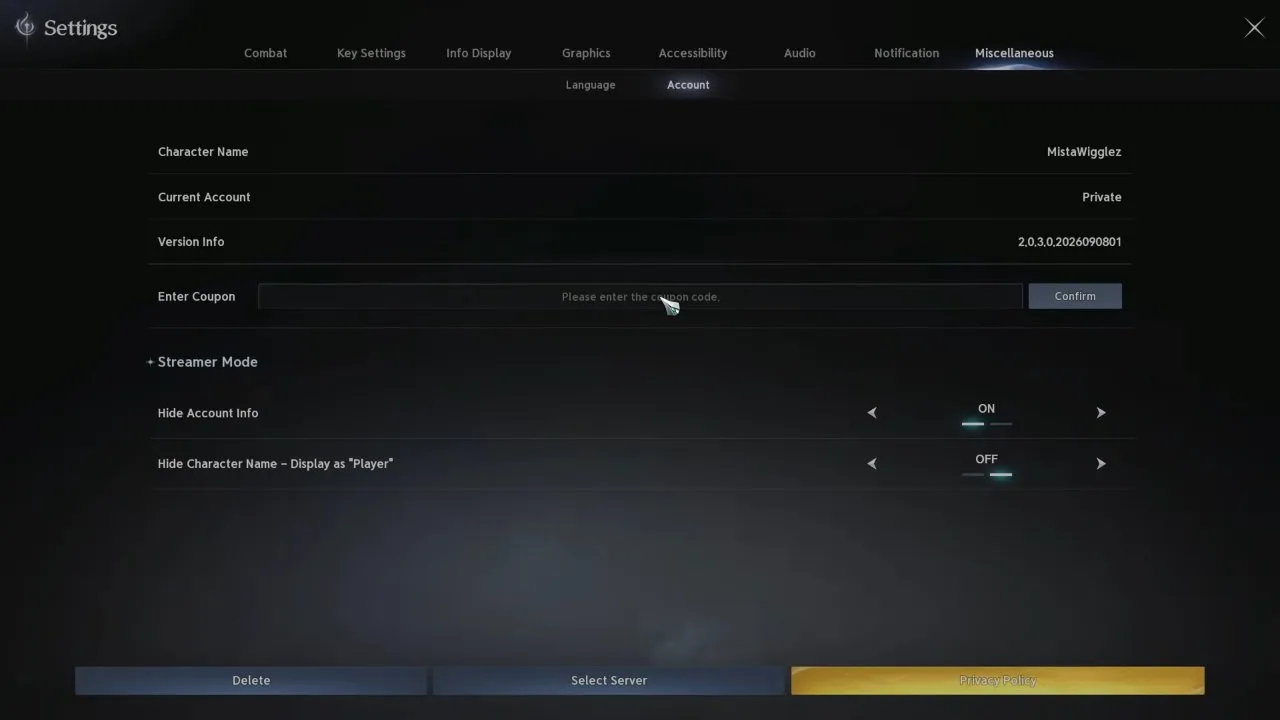
Open the Miscellaneous tab and select the Account sub-tab. You are in the right place when you can see the Enter Coupon text box. You do not need a separate website redemption portal for this route.
Enter TAKEFLIGHTAION2 and confirm
Type or paste TAKEFLIGHTAION2 into Enter Coupon. Check the field against the code above, then click Confirm. If the coupon is active and your account has not claimed it already, the rewards are added directly to your Cube inventory.
Check your Cube inventory
Look for the three Bound reward types in the reward table. Inventory delivery is the useful completion check: look for the items rather than relying on a confirmation message.
What If the Rewards Do Not Appear?
Start with the conditions you can actually check: the code in the field, your region's deadline, whether this account already redeemed the coupon, and available Cube inventory space. A second character does not reset the account limit, so swapping characters is not a way to claim another package.
There is no established error-message list or recovery procedure here for a failed redemption. If your claim does not deliver the items, those checks narrow down what to inspect without promising that repeated submissions will fix it.
Once you can see the rewards in your Cube, the claim is complete: you have the four Odyle Energy, five Resurrection Spiritstones, and ten Battle Enhance Scrolls listed above, all Bound. For your next resource question, head to AION 2 Kinah; this coupon's reward list contains the three item types above and does not list Kinah.