
Once replacement equipment leaves unwanted pieces in your Cube, you can clear them through Item Extraction. If you're looking up AION 2 how to get rid of old gear, select the piece in your inventory, click the flask icon, review what you'll lose and receive, then click Confirm. For tradable gear, check its Market value before extracting it.
Should you extract, sell, or keep old gear?
Extract unwanted gear: recommended for clearing space
Choose Item Extraction for equipment you no longer need, especially pieces you cannot trade or that have little Market demand. Extraction consumes the gear and costs a small amount of Kina, but gives you upgrade materials such as Enhance Stones and the extracted piece's cosmetic skin in the Closet.
That turns Cube clutter into something useful for your AION 2 gear progression. Check the extraction preview for the actual rewards before you commit.
Sell tradable gear with Market value
Check the item's information to see whether it is tradable, then check its Market value. Equipment another player needs for progression, crafting, or optimization may be worth selling for Kina instead of breaking down.
Use that tradability check to decide which pieces deserve a price check. If currency is your priority, continue with AION 2 Kinah after sorting your gear.
Keep pieces with upgrades you still need
Before getting rid of an upgraded piece, consider transferring its upgrades to your replacement. Most upgrades, including rerolled stat lines and enhancement levels, can transfer to new gear; mana stones do not carry over. Check your replacement's stat lines and enhancement level after transferring, before treating the old piece as disposable.
If you're still choosing replacements, work through the AION 2 guide to 1400 first. Keeping a useful piece temporarily is safer than extracting it while you still need its upgrades.
Before extracting several items at once, double-check for valuable Unique gear and equipment you still need for another progression system. The preview lists the equipment you lose, so read that side as carefully as the rewards.
Where is the extraction button in the Cube?
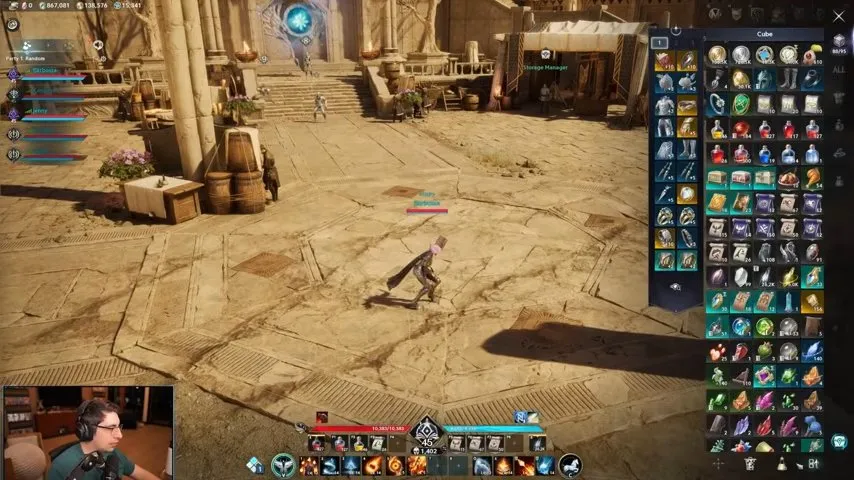
The button looks like a beaker or flask. Hover over it to check that its command is Extract before clicking.
- Open your inventory, the Cube. You should see your inventory items, as in the screenshot above.
- Click the unwanted piece once. Its gear description panel is where you look for the extraction control.
- Find the flask icon on the right, near the bottom of that panel. Hover to verify Extract, then click it. The Item Extraction menu should open.
- Review the item you lose and the items you gain. Confirm that the listed equipment is the piece you meant to remove and that you're happy with the rewards. Each extraction costs a small amount of Kina.
- Click Confirm. The selected gear is consumed in exchange for the extraction rewards. Check that the old piece is gone from your Cube.
What do you get after clearing old gear?
You free up Cube space, recover upgrade materials, and gain the extracted equipment's appearance in the Closet. Check the Closet for the skin when appearance was your reason for extracting the piece.
Once the unwanted equipment is cleared, return to upgrading the pieces you're keeping. If your next question concerns amplification, head to the AION 2 Amplify Stone guide.